Consent Phishing: A New Scam the FBI Is Warning About
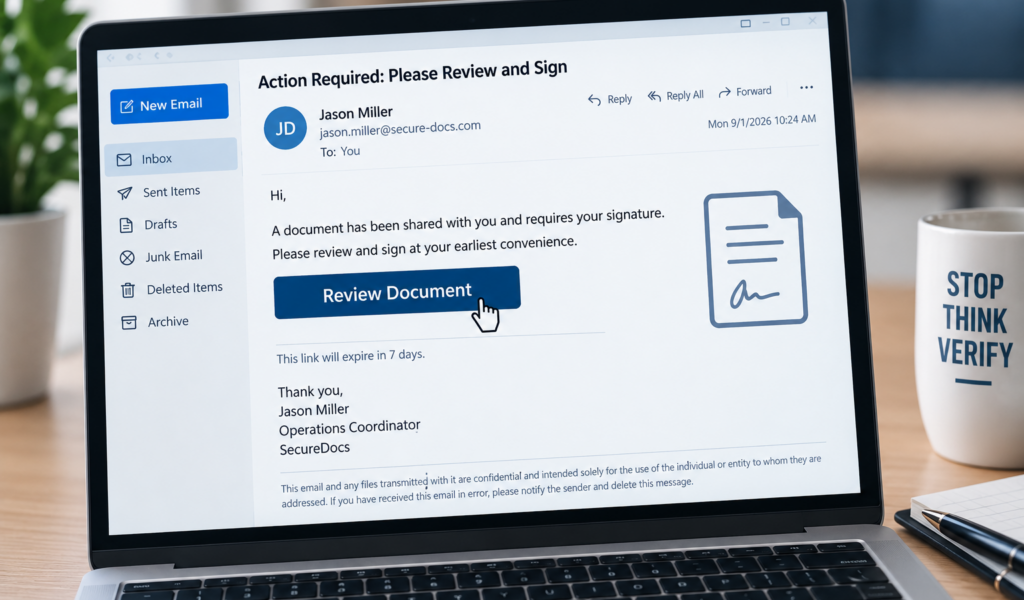
Most of us have learned to be suspicious of emails and text messages asking for our passwords. But what if a scammer doesn’t need your password at all?
The FBI recently issued a warning about a scam known as consent phishing, a technique cybercriminals are using to gain access to email accounts, files, and other personal information.
What makes this scam especially concerning is that the link you click may eventually take you to a real, legitimate login or permission screen. Instead of stealing your password, the scammer is trying to convince you to give a malicious application permission to access your account.
What Is Consent Phishing?
Consent phishing often starts with an unexpected email, text, or direct message.
The message may appear to come from someone you recognize or trust and ask you to view a document, open a shared file, verify your identity, or respond to an invitation.
After clicking the link, you may be asked to sign in through a familiar service such as Microsoft or Google. You could then see a screen asking you to give an application permission to do things such as:
• Read your emails
• Send emails on your behalf
• Access your files
• View information connected to your account
Here’s the catch: the permission request may be real, but the application requesting access is controlled by a scammer.
If you select “Allow” or “Accept,” you could unknowingly give that application access to your information.
Why Is This Scam Different?
Traditional phishing scams often try to steal your username and password by sending you to a fake login page.
Consent phishing takes a different approach.
The scammer may use legitimate authorization systems to request access to your account. That means your password isn’t necessarily stolen, and even multi-factor authentication may not stop the scam if you willingly approve the application’s permissions.
Even more concerning, simply changing your password may not remove the application’s access.
The permission you granted may remain active until the malicious application or its access is removed from your account’s security settings.
What Could a Consent Phishing Message Look Like?
You might receive a message saying:
“A document has been shared with you. Sign in to review it.”
Or:
“You’ve been invited to an event. Please verify your identity to view the invitation.”
The FBI says criminals have used impersonation tactics involving trusted or recognizable people and have also posed as event coordinators or planners.
The goal is to make the request seem normal enough that you click the link and approve access without thinking twice.
How to Protect Yourself
Before approving access to an app or service:
• Be cautious with unexpected links, even when the message appears to come from someone you recognize.
• Verify unusual requests with the sender using contact information you already know.
• Read permission screens carefully before selecting “Allow” or “Accept.”
• Don’t give an unfamiliar application access to your email, files, contacts, or other personal information.
• Review the applications connected to your important online accounts and remove ones you don’t recognize or no longer use.
• If something doesn’t look right, stop and verify before continuing.
What If You Already Clicked “Allow”?
If you think you may have granted access to a suspicious application, don’t assume changing your password is enough.
Review your account’s security settings and connected applications and remove any access you don’t recognize. You should also review your account for suspicious activity and report the incident to the FBI’s Internet Crime Complaint Center at IC3.gov.
If you believe your financial information or Michigan United Credit Union account may have been compromised, contact us as soon as possible.
Michigan United Credit Union Is Here to Help
Scams continue to change, but one piece of advice remains the same: slow down and verify before you click, respond, or approve anything you weren’t expecting.
A permission screen may look legitimate, but that doesn’t automatically mean the application asking for access is trustworthy.
Taking a few extra seconds to review what you’re being asked to approve could help keep your personal and financial information protected.